

L'image est séparé en "pixel", chaque "pixel" possède une couleur
C'est comme si c'était des p'tites graines qui faisaient l'image sur l'écran (https://youtu.be/SCvVatKfp2Y?feature=shared&t=65)
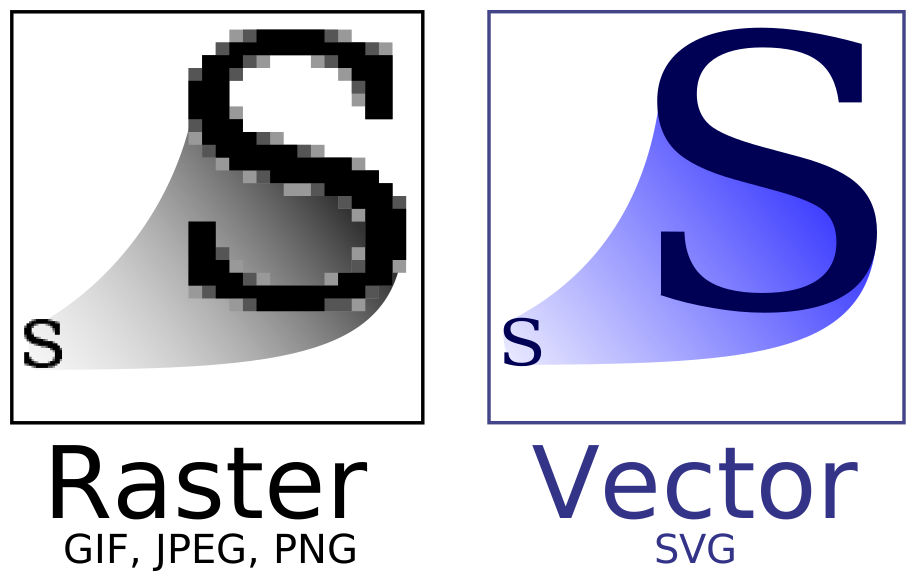
Une image vectorielle (ou image en mode trait), en informatique, est une image numérique composée d'objets géométriques individuels, des primitives géométriques
-- wikipedia

<html>
<body>

<h4>Ceci n'est pas un cercle</h4>

<svg width="500" height="100" style="border: solid">
  <circle cx="50" cy="50" r="40" stroke="green" stroke-width="4" fill="yellow" />
</svg>

</body>
</html>
<style>
   #my-circle {
     fill: red;
   }
</style>

<h4>Ceci n'est pas un cercle</h4>

<svg width="500" height="100" style="border: solid">
  <circle id="my-circle" cx="50" cy="50" r="40" stroke="green" stroke-width="4" />
</svg>

Un svg est une collection de cercles, rectangles, textes,... sur un canvas
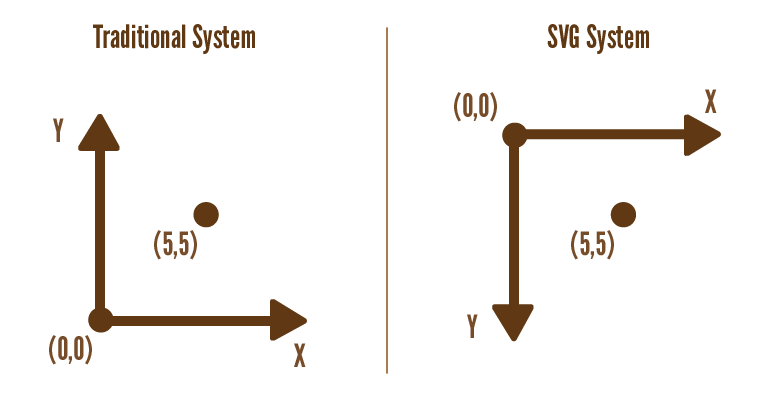
Les coordonnées d'un svg sont en "pixel" mais acceptent des nombres à virgule
La direction de l'axe des ordonnées est inversée
<svg width="500" height="100" style="border: solid">
  <circle cx="50" cy="50" r="40" stroke="green" stroke-width="4" fill="yellow" />
</svg>
circlecx, cy: le centre du cercle<svg width="500" height="100" style="border: solid">
<rect x="25" y="25"width="50" height="50" stroke="green" stroke-width="4" fill="yellow" />
</svg>
rectx, y: le coin supérieur gauche du rectablewidth: la largeur du rectangleheight: la hauteur du rectangle<svg width="500" height="100" style="border: solid">
<text x="50" y="50">Ceci est un text qui sera très long pour aucune raison précise</svg>
</svg>
textx, y: le position du text<svg width="500" height="100" style="border: solid">
<g style="fill: red; stroke: pink; stroke-width: 3;">
<rect x="25" y="25"width="50" height="50" />
<rect x="100" y="25"width="50" height="50" />
</g>
</svg>
g
| Quoi | Nom | Valeur |
|---|---|---|
| La couleur de l' intérieur | fill |
une couleur html |
| La couleur du coutour | stroke |
une couleur html |
| La transparence de l'intérieur | fill-opacity |
nombre entre 0 et 1 |
| La transparence du coutour | stroke-opacity |
nombre entre 0 et 1 |
| Largeur du contour | stroke-width |
nombre positif |
<svg width="250" height="250" style="border: solid">
  <rect x="25" y="25" width="50" height="50" stroke="green" stroke-width="4" fill="yellow" />
  <rect x="50" y="50" width="50" height="50" stroke="green" stroke-width="4" fill="yellow" />
</svg>
<svg width="250" height="250" style="border: solid">
  <rect x="25" y="25" width="50" height="50" style="stroke: green; stroke-width: 4; fill: yellow;" />
  <rect x="50" y="50" width="50" height="50" style="stroke: green; stroke-width: 4; fill: yellow;" />
</svg>

Dessinez les blocs tetris en svg
Dessinez un bonhomme sourir en svg 😁